Nomad eSIM Review – Nomad eSIM offers digital SIM cards (eSIM) for over 200 countries and regions. With an eSIM from Nomad, there is no need to change your physical SIM card or visit a store. You can purchase your virtual card in the online shop before you leave and install it right away so that you have a mobile data connection as soon as you arrive in your destination country.
After purchasing your eSIM, you will receive an email containing a QR code. Scanning the QR code will install an eSIM profile on your phone. Your eSIM profile contains the data volume you have selected. Most providers offer data packages starting at 1 GB, ranging from medium packages (10-20 GB) to unlimited data plans.
In our experience, Nomad is one of the best and most straightforward providers. Setting up eSIMs is very easy and only takes a few minutes. What’s more, Nomad offers fair prices.
Please note that an eSIM can only be installed on an eSIM-enabled device.
Nomad’s plans are exclusively data plans. Only a few providers offer plans that also include call minutes and text messages (Airalo offers voice and text messaging in its global plan and for some countries).
Data Packages and Prices - Nomad eSIM Review
What plans does Nomad offer? Nomad offers a wide range of prepaid data plans that can be used for a specific country, region (e.g., Southeast Asia, Central America, Europe), or globally (up to 123 countries worldwide). In most cases, the tariffs are valid for 1–60 days. The size of the data packages ranges from 1 GB to plans with no GB limit.
How much does Nomad cost? Prices vary depending on the country or region and the size of the package. In general, however, Nomad’s eSIMs are cheaper than the roaming charges of your regular provider. In our experience, they are a little more expensive than local SIM cards, but you can install them before you leave , saving you the hassle of changing cards and finding a store. In addition, packaging materials and transport costs are saved.
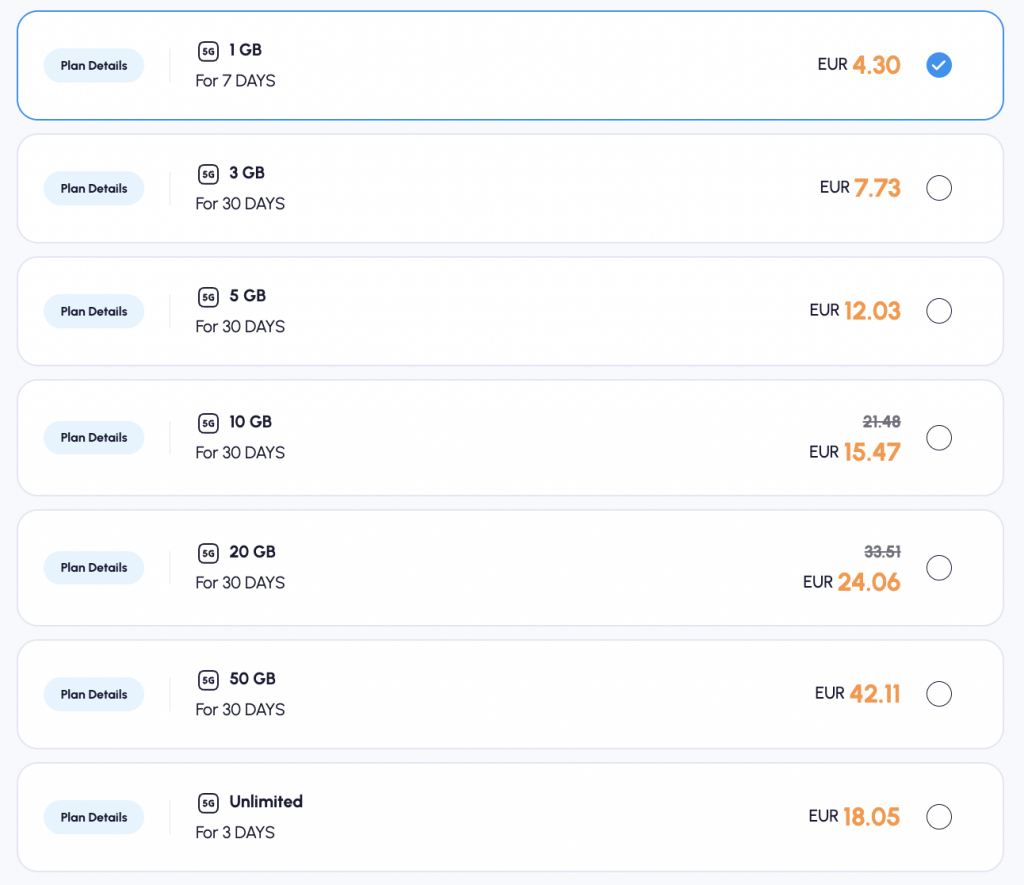
Here are a few examples of country-specific and regional rates:
Data plans offered for the Dominican Republic:
- 1 GB for 7 days = EUR 5.12
- 3 GB for 30 days = EUR 13.65
- 5 GB for 30 days = 17.91 EUR
- 10 GB for 30 days = 21.32 EUR
- 20 GB for 30 days = 24.74 EUR
- 50 GB for 30 days = 58.86 EUR
Regional tariff covering 8 countries in Southeast Asia and Australia:
- 1 GB for 7 days = EUR 5.12
- 3 GB for 30 days = 10.24 EUR
- 5 GB for 30 days = EUR 11.94
- 10 GB for 30 days = EUR 14.50 (on offer, previously EUR 21.32)
- 20 GB for 45 days = EUR 20.47 (on offer, previously EUR 33.27)
- 30 GB for 60 days = $44.99
The larger the data package and the more popular the destination, the cheaper the price per GB usually is.
Payment options: Paying on the Nomad website is very easy. Common payment methods such as credit cards (Visa, MasterCard, etc.), PayPal, Apple Pay, and Google Pay are accepted. This allows you to pay for your eSIM quickly and easily with just one click.
Note: All Nomad eSIMs are prepaid cards, so there are no hidden costs and you are not tied to a long-term contract. Once the data has been used up or the validity period has expired, the internet connection is terminated. If you want to be on the safe side and don’t want to suddenly find yourself without data, you can activate automatic renewal in the app, which automatically purchases a new package before your data runs out.
Nomad eSIM Review - Installation and Activation
Setting up a Nomad eSIM is quick and easy. The only important thing is that your smartphone is compatible with eSIM technology.
You can install your card using one of the following options:
- Via the Nomad app: This is the easiest option. First, download the Nomad app and select your data plan. Your eSIM can then be installed with a simple click in the app. This is possible for both iOS and Android users.
- Via QR code (web portal or email): This is the most common method for setting up your eSIM profile. After purchasing your plan, you will receive an email containing a QR code. Scan this QR code in Settings > Mobile network > Add mobile plan. This will download and install the eSIM profile. This method is convenient if, for example, you are ordering from your laptop or do not want to use the app. The QR code can also be displayed via the app if you prefer to scan it. It is important to have two devices available for this method: one device to display the code and your smartphone on which the profile is to be installed.
- Manual setup: If the QR code does not work, you can also install your eSIM manually. All you need is the SM-DP+ address, which you will also find in the email. Simply enter this manually when you go to “Add eSIM.”
Step-by-step: Using and activating Nomad eSIM (instructions):
- Install the Nomad app – Download the Nomad eSIM app for Android or iOS. (Alternatively: Visit the Nomad website in a browser.)
- Select your destination and data package – Open the app and search for the country or region where you need mobile internet. Select the appropriate data plan from those offered (e.g., data volume and validity period).
- Create an account (optional) – With Nomad, you can even make your first purchase without a permanent account. However, you can also create a user account to manage your purchases. (Tip: It’s faster without registration, but you can always register later to synchronize your data usage, for example.)
- Pay – Add your preferred payment method (credit card, PayPal, Apple Pay, etc.) and complete your purchase. Prices are displayed in USD in advance for your convenience.
- Receive eSIM – After successful payment, Nomad will create your eSIM profile. Either the app will now show you a “Install eSIM” button (especially on the iPhone) or you will receive a QR code (in the app and by email).
- Install eSIM profile –
- If you are installing in the app: Confirm the prompt to add a new mobile profile, if necessary. The phone will add the Nomad eSIM profile to the mobile settings.
- With the QR code: Open the camera or the Add eSIM function in the settings and scan the QR code. Follow the instructions to load the profile.
- Configure settings – Name the new eSIM profile for better overview (e.g., “Nomad USA”) and set it as the active profile for mobile data. Ensure that data roaming is enabled for the Nomad profile. At the same time, you should disable data roaming on your home SIM to avoid accidental roaming charges.
- Complete activation – The eSIM usually becomes active within seconds or a few minutes after installation. Once you arrive at your destination (or if you have already activated it there), the device will automatically connect to the local partner network. You should then be able to use mobile data right away. Check the status bar to see if you have reception (4G/LTE/5G) and test your internet connection.
Our tip: In our experience, it is best to install your virtual card before you leave, so that you have mobile data available as soon as you arrive. Your data plan will only become active when your device connects to a local provider for the first time.
Important! Roaming and mobile data must be turned on for your Nomad eSIM to work.
Supported Devices (Compatibility)
Nomad works with all newer models that have eSIM technology built in. It is important that your device is not locked (SIM-lock-free).
iPhones are eSIM-enabled from the iPhone XR / XS (2018) models onwards, and iPads are compatible from the iPad Pro 3 onwards. Samsung has been using eSIM technology since the Galaxy S20.
If you are unsure whether your phone is eSIM-compatible, you can either check this in your settings. If the “Add eSIM” option is available, your phone uses eSIM technology, or you can check your model on Nomad’s list of supported devices.
Conclusion on compatibility: Nomad eSIM itself does not have any additional hardware requirements. If you have used an eSIM on your device in the past, Nomad will also work on your phone. Current models are eSIM-compatible in any case.
Nomad eSIM Review: Network Coverage and Performance
Networks & coverage: Nomad itself does not have any networks, but uses a local mobile network that is dialed into with the eSIM. Well-developed partner networks are generally used to enable a stable and fast connection. Depending on the network, speeds of up to 5G are possible, provided that your network is 5G-capable and the partner network has a well-developed 5G network. As with our domestic networks, reception in very rural areas may fluctuate somewhat and the connection may be slightly slower.
Mobile hotspot (tethering): If you want to use other devices with mobile data, you can do so via the hotspot. Unlike some other providers, Nomad does not limit hotspot usage. This means you can also connect to a laptop and use Nomad’s mobile data. However, please note that this will increase your data consumption.
Customer Service and Support
Nomad’s customer service is available 24/7 and can be contacted by email or chat. When you use the chat, you will first be connected to a chatbot. If the chatbot cannot solve your problem, you will be connected to a customer service representative. Communication in the chat is in English. In our Nomad eSIM review the customer support gets 4 out of 5 stars.
The reviews of the customer service on Trustpilot are predominantly positive. Many users rate the support as fast, competent, and friendly.
If you don’t want to contact customer service directly when you have a problem, you can first look for a solution in the help section.
In summary: Nomad’s customer service is available online around the clock, responds quickly and is solution-oriented, but is only available in English. For a purely digital product, the level of support is decent. In general, it can be said that the installation and use of the virtual cards are so easy that problems only arise in exceptional cases.
Nomad eSIM Customer Experiences and Reviews
The user reviews of Nomad are predominantly positive, as evidenced by the good average rating of 4.3 on Trustpilot. Many customers praise the easy setup of the eSIMs and the low prices compared to many competitors. The stable internet connection is also mentioned positively for various countries. The customer service is described as competent and friendly. The iOS (rating 4.8) and Android app (4.7) both score above average.

Advantages and disadvantages - Nomad eSIM Review
Finally, here is a concise overview of the most important advantages and disadvantages:
Advantages:
- Global coverage in 200+ countries – you can get eSIMs for over 200 countries and regions. A global tariff with worldwide coverage is also available.
- Very affordable rates – Nomad’s rates are often cheaper than other providers and roaming charges.
- Flexibility – all data plans are prepaid and you are not tied to any contract.
- Easy installation – simply click in the app or use a QR code.
- Instant online access – your eSIM can be activated before you travel, so you have a mobile data connection as soon as you arrive at your destination.
- Hotspot function – mobile data volume can be shared with a laptop/tablet without limit (in most countries).
- App with real-time overview – you can conveniently check your usage, manage your eSIMs, and purchase additional data in the app.
- Numerous payment methods – including PayPal and Apple/Google Pay for fast payment.
- Promotions and discounts – you can get discounts with coupon codes.
- 24/7 customer support – Competent, friendly, and responsive customer service via chat and email.
- Environmentally friendly – no plastic card waste, no packaging material, no long transport routes.
Disadvantages:
- No phone calls or text messages – only data plans without a local phone number are offered (calls and text messages are not possible).
- English-language support only – no customer service in German available at this time
- Website/translation – the German translation of the website still needs some improvement.
Conclusion: Nomad eSIM Review
Nomad is a professional provider with a good selection of tariffs at affordable prices. The virtual cards are easy to install using various methods, and both the iOS and Android apps are very user-friendly. Most customers have positive experiences when using the provider and the Nomad eSIM Reviews on Trustpilot a very good in average. Its stable connection, easy installation, and user-friendliness are often praised, as is its competent customer service.
All in all, we can recommend Nomad eSIM with a clear conscience. Especially for digital nomads, frequent travelers, or even occasional vacationers who want to stay easily reachable, it is a modern solution that replaces the former hassle of local SIM cards or expensive roaming. Find out in advance whether your device is eSIM-compatible, grab a voucher if necessary, and then nothing will stand in the way of carefree surfing abroad! Have a good trip and enjoy trying out Nomad eSIM.
Frequently Asked Questions (FAQ)
Does Nomad eSIM allow phone calls or text messages?
No. It is not possible to make calls via a regular telephone network or send text messages, as Nomad eSIMs are data-only plans.
Can I top up my Nomad data allowance when it runs out?
Yes, you can purchase another data package at any time in the Nomad app, but this will then work via a new eSIM profile. It is not yet possible to top up the same profile.
How long is a Nomad eSIM valid?
This depends on the plan you have purchased. Most plans are valid for between 7 and 30 days, but there are also packages that are valid for longer.
Can I use Nomad eSIM in a dual SIM cell phone alongside my normal SIM?
Yes, that’s exactly what it’s designed for. Your phone will then have two active “SIMs”: your physical card (e.g., your US number) and the Nomad eSIM for data. In the settings, you can specify that mobile data runs via Nomad, while your normal SIM is used for calls/text messages. Be sure to turn off data roaming on your normal SIM to avoid costs.
Are there roaming charges when Nomad eSIM is active?
No, roaming charges are replaced with a local tariff. The main reason for using eSIM is that you no longer have to pay high roaming charges.
What happens if I use up my data allowance before the end of the period?
If your high-speed data allowance is used up prematurely, you will either be throttled or the connection will stop. In most cases, the data connection ends as soon as the allowance is used up.
Does Nomad offer a money-back guarantee or refund?
If you have not yet used the data or there is a technical problem, your money will be refunded.
Is Nomad safe to use?
Yes. An eSIM behaves exactly like a physical SIM card, but you cannot lose the virtual card.
Can I keep the Nomad eSIM and reuse it later?
Technically, the eSIM profile remains stored on your phone even after the data package has expired. However, you cannot reactivate or recharge the same profile once it has expired. You will need to install a new eSIM profile for your next trip.
What alternatives are there to Nomad?
The best-known alternatives are Airalo and Holafly. Airalo is very similar to Nomad in terms of concept and pricing. Holafly offers unlimited data in many countries, but is significantly more expensive and often only worthwhile for short trips. An insider tip is Jetpac, a provider that impresses with low prices and a very good Trustpilot rating.
"In diesem Beitrag verwenden wir sogenannte „Affiliate Links“ (Werbelinks). Diese leiten dich zu Produkten und Dienstleistungen, welche wir dir zu 100% empfehlen können. Solltest du über diese Links etwas buchen/kaufen, erhalten wir als Dankeschön eine kleine Provision. Dir entstehen dadurch aber keine weiteren Kosten. So können wir auch weiterhin all unsere Inhalte, Bilder und Videos völlig kostenfrei für dich anbieten."


