Maya Mobile eSIM Review – Maya Mobile is a relatively new eSIM provider (founded in 2021 in the US) that aims to offer customers a straightforward, positive eSIM experience without expensive roaming charges or the need to constantly change physical SIM cards.
Maya Mobile offers eSIMs for over 200 countries and regions. In our detailed review, we provide background information on the Maya Mobile company and give you all the important information on prices, installation, activation, network coverage, user-friendliness, hotspot usage, and payment methods. We share our experiences with customer service and inform you about which devices are compatible. We look at customer reviews and compare Maya with other providers. Finally, we highlight the pros and cons and list some FAQs.
Maya Mobile eSIM Review - Background and Overview
Maya Mobile is a user-friendly eSIM solution that provides a stable mobile internet connection while traveling. The company was founded in 2021 and is based in the USA. The virtual cards can be used in over 200 countries and regions without having to change your physical SIM card. Instead of buying a local SIM card, you can choose a data plan before you leave and install it on your smartphone so that you have a fast, reliable internet connection as soon as you arrive. With Maya’s eSIMs, you don’t get a local phone number and you can’t send text messages; these are data-only plans that focus on providing a stable internet connection so you can use apps for navigation or communication.
Maya Mobile’s main focus is on offering a good selection of different plans, from low data volumes to unlimited data plans. Whenever the local network allows, they try to provide 5G speeds.
Plans and Prices from Maya Mobile
What kind of plans does Maya Mobile offer? Maya Mobile basically offers two types of data plans:
- Limited data packages: These are prepaid data plans that are “limited” to a fixed data volume and are valid for a certain number of days. For example, for short trips, data packages of 1 GB can be selected, which are valid for 7 days. If you are traveling for longer, you can choose a larger data volume and also adjust the validity period for the plan. As a rule, the data plans and prices offered vary depending on the country for which you want to purchase your data package. Some countries start at around $6 (approx. €5–6) for 1 GB/5 days, for example, while larger packages for more expensive regions cost more accordingly (for example, 40 GB for Europe costs around $34.99 – approx. €33 – with a 30-day term). There are many other options between these extremes, so you can find a suitable data package for almost any destination.
- “Unlimited” data plans: As the name suggests, Maya Mobile also offers unlimited data plans, which means you are not limited to a fixed data volume, but can use an internet connection for as long and as much as you want until the plan expires. You only choose the period for the unlimited tariff. You can book unlimited plans for 7 to 180 days and surf the internet as much as you want during this period. These plans are usually slightly more expensive than the limited ones, but the daily price is reduced for packages that are valid for longer periods.
However, there is a fair use mechanism: a daily high-speed data allowance is available, after which the speed is throttled. Specifically, Maya Mobile usually has two unlimited options:
- 3 GB of high-speed data per day – depending on the region, the price ranges from about $2.25 to $4.50 per day.
- 5 GB high-speed per day – priced at approximately $3.70 to $5.40 per day.
If you exceed the daily 3 GB or 5 GB volume, you can continue surfing, but at a reduced speed for the rest of the day. However, the next day you will have full speed again until you reach the limit. These rates are particularly suitable for heavy users who need a lot of data (e.g., stream a lot) or digital nomads who use the Internet for several hours a day.
Different types of plans (country-specific, regional, global)
Maya Mobile offers various area-specific eSIMs. For example, you can choose an eSIM for a specific country, but you can also purchase cross-border (regional) data plans (South America). For those who travel to many countries in different regions, a worldwide (global) tariff might be interesting.
Country packages: You select a specific country for your trip and then choose the data volume that is relevant for you. With Maya, you can choose data packages for pretty much every country in the world.
Regional: If you are a backpacker planning to travel to several countries, a regional package might be of interest to you. These are available for entire continents (Europe) or parts of a continent (Southeast Asia, South America) and include various countries.
Global packages: This is a tariff that applies worldwide and covers all countries offered by Maya. This plan is suitable for world travelers or business travelers who regularly travel to different countries.
How much does Maya Mobile cost? – The cost depends heavily on the desired data volume, the term, and the destination country or region. Small packages starting at 1 GB for a period of 7 days start at just €5, with rates for Thailand, for example, being cheaper than rates for Australia. Medium data plans often range between €15 and €30, while large plans over a long period can cost up to €60 or more. Compared to the roaming charges of most mobile phone providers, these prices are usually significantly cheaper. Maya Mobile is also positioned in the lower price range compared to other eSIM platforms.
Customer reviews often mention that Maya offers the best value for money, especially for larger data volumes or in expensive regions where local SIM cards are already very expensive.
Auto-Top-Up and Renewal: If you are traveling for a longer period of time and don’t want to worry about running out of data, you can set up the auto-renew function in Maya, which automatically renews your plan before your data is used up. You can specify in advance which package will be used to top up your data volume. The function can be set for up to 180 days. For example, you could set the function so that new data is booked every 30 days for a period of 6 months.
Auto-Top-Up is disabled by default to prevent unintended charges.
Note: All Maya eSIMs are virtual prepaid cards and are not tied to any contracts. There are no hidden fees or subscriptions. You only pay for the data you have actually purchased, unless you activate the automatic renewal mentioned above. Maya Mobile also offers a 180-day money-back guarantee: if the eSIM does not work on your device or you change your travel plans, you can request a full refund up to 180 days after purchase. In our experience, this usually goes smoothly.
Maya Mobile eSIM Review - Installation & Activation
How do you set up an eSIM profile and how easy is it? Installing a Maya eSIM is quick and easy. It usually only takes a few minutes to set up. Maya is one of the few providers where everything can be done via a web browser without having to download an extra app. The setup usually works as follows:
Note: Check beforehand whether your smartphone is eSIM-compatible!
- Receive QR code: After purchasing a data plan (see below How do I purchase a Maya eSIM?), you will receive an email containing a QR code at the address you provided. This code contains all the information you need to create the eSIM profile on your phone.
- Scan the QR code: With the QR code you received, go to the settings on your eSIM-compatible smartphone (iPhone: Settings > Mobile Network > “Add Mobile Plan”; Android: Settings > Connections > SIM Management or similar). There, select the option to add a mobile plan via QR code and scan the QR code (either from a second device/display or from a printout). Once the code is recognized, the phone will download the eSIM profile from Maya Mobile.
- Manual entry (alternative method): If the QR code does not work for any reason, or if you cannot scan it (e.g., because you only have one device at hand), Maya Mobile also offers the option of manual activation. In addition to the QR code, the email or user account also contains an activation code and, if necessary, a server address (SM-DP+ address). This data can be entered manually into the smartphone under “Enter code instead.” This allows you to add the eSIM even without a camera. This option can be useful if you are having problems with the QR code or do not have two devices available. Or if you are already abroad and do not have a second screen.
- Install profile: After scanning, an eSIM profile is created, which you can name. For example, Maya Thailand or Maya eSIM, so you know which country or which eSIM is being used.
- Activation in the destination country: You can set up your eSIM before departure, but it will only be activated when you arrive in the destination country and your cell phone connects to a local provider. Only then will your data volume be used and the validity of the tariff calculated. However, make sure you turn on roaming and mobile data before you arrive. In this case, no roaming charges will be incurred as you are using a local tariff.
- Start using: If roaming and mobile data are active, you should see reception after a short time and have a data connection via your Maya eSIM. You can either deactivate your regular SIM or run it in parallel if you want to be able to receive calls and text messages (depending on your device).
Customer experiences with installation are very positive, and setup is generally considered very easy. In addition, there is no need to handle the physical device, and it cannot be lost. It often takes only a few minutes from purchase to connection.
Different activation methods:
QR code method: After purchase, you will receive a QR code in an email. Open it on a second device and scan it with your cell phone.
Manual: Alternatively, you can use the manual method via code. You will also find the relevant data for this in the email (SM-DP + server address). This is only necessary if there are problems with the QR code.
Note: You should install the eSIM before departure so that you have an internet connection immediately after landing.
Overall, Maya Mobile scores highly in terms of ease of installation. Although there is no app, everything works smoothly via the web browser.

Network Coverage and Speed
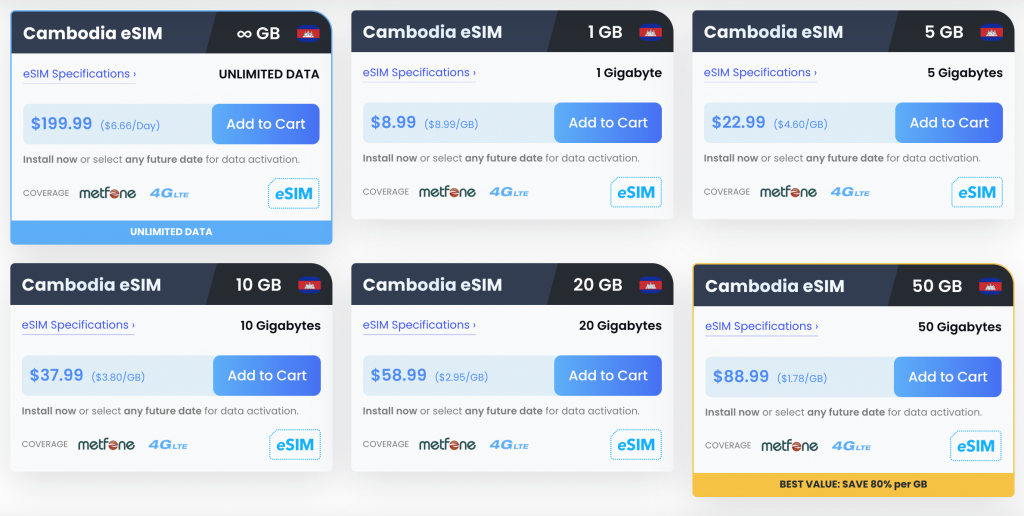
Which networks does Maya Mobile use? eSIM providers do not have their own networks, but use the networks of local mobile providers. For example, if you are traveling in Cambodia, you will use the local network of Metfone (Viettel). In our experience, Maya usually uses at least one high-quality, well-developed mobile network in most countries, but often several, in order to guarantee a stable and fast connection. Maya automatically selects the network with the best signal strength.
Examples of partner networks:
- In the US, Maya uses the mobile networks of AT&T or Verizon (both top nationwide providers, including 5G).
- In France, Orange and Free Mobile are used, among others.
- In Italy, for example, Vodafone and Iliad.
- In Australia, the Optus network is used.
- In Germany, O2 and Vodafone are used for data transmission.
- A total of over 200 network operators worldwide are connected.
Because multiple networks are often used, you can expect very good network coverage in most countries. If reception is not so good, your eSIM may be able to switch to a stronger network. This increases the chance of maintaining a stable connection even in rural areas or in the event of network disruptions.
Geographic coverage: As mentioned, Maya Mobile covers over 200 countries – from popular travel destinations in Europe, North America, and Asia to more remote locations. Virtually all continents are represented. There are regional bundles that cover, for example, all of Europe or Asia, and for truly exotic destinations, you can usually find an individual package. The Global eSIM (119 countries) combines many of these. Nevertheless, before traveling, you should check the Maya website to see if your destination country is supported and if it is included in the Global package. Some user experiences indicate that individual countries such as Montenegro caused problems in certain packages (e.g., Balkans Pass) or did not work at times. However, such cases are rather the exception; normally, coverage is excellent.
Speed (4G/5G) and stability: Maya Mobile enables data connections at up to 5G speeds wherever the partner network offers 5G and the device is 5G-enabled. Many customers have had very good experiences with the connection and report very fast speeds. The speed depends on the location and network, and Maya has no influence on the speed. In large cities, most providers, including Maya, have had no connection problems. In very remote regions, the speed may vary. In principle, you get the same connection as when you buy a local eSIM.
Calls and Hotspot Use - Maya eSIM Review
Does Maya Mobile allow phone calls? – As with most providers, except for Airalo and SimOptions, regular phone calls and sending SMS messages are not possible. Accordingly, you will not receive a local phone number.
However, this does not restrict most travelers, as phone calls can be made easily via WhatsApp, Zoom, or Facetime. If you still want to receive regular calls and text messages, you can continue to use your regular SIM card in parallel with the eSIM.
Does Maya Mobile support mobile hotspots (tethering)? – Yes, Maya allows the use of hotspots, so you can share the connection with other devices via the Wi-Fi hotspot. This means you can also connect your laptop or a laptop . Other providers such as Holafly, which only offer unlimited data, limit the use of hotspots to prevent abuse.
In practice, this means that if you want to use your laptop, you turn on “Personal Hotspot” on your cell phone and then connect to your computer. Of course, you also use the data from your plan here. Several devices can also access the hotspot, but if several devices frequently use the hotspot, you should perhaps purchase a larger data package.
In summary: Phone calls/text messages directly via Maya Mobile are not possible, internet telephony is possible, and hotspot use is permitted. As a rule, a data-only plan is perfectly adequate for travelers, but if you need to be reachable by text message or phone (e.g., for verification purposes), you may need to use your regular SIM card at the same time.
Payment Options
Maya Mobile offers all common payment methods. The following payment methods are accepted:
- Credit cards: Visa, MasterCard, American Express (and Discover, JCB, etc. as well).
- PayPal: You can easily pay via PayPal.
- Mobile payment: Apple Pay and Google Pay are supported, so you can pay on your iPhone or Android with stored cards without having to re-enter your card details.
The good selection of payment methods is very user-friendly. There are no fees for any of the payment methods offered. The default currency is USD, but this can be changed to other common currencies such as EUR or GBP. Ultimately, the dollar amount or the converted amount will be debited.
Billing & Account: At checkout, you will be asked to create a Maya account (if you haven’t already done so), where you can store your payment details, among other things. Here you can store, manage, and set different payment methods as your primary method. For the auto-renewal feature, you must have a payment method on file with sufficient funds to cover the charge when the data plan is renewed.
It is also particularly pleasing that Apple Pay and Google Pay can be used, which some other providers do not offer.
Overall, it can be said that a very good selection of payment methods is offered and that payment processing runs smoothly.
Customer Service and Availability
An important criterion when choosing an eSIM provider is customer service and availability. Is customer service available 24/7? Is there a help page? Do you talk to a chatbot or a customer service representative? What channels are available for communication?
Support is a critical aspect of any mobile phone service, especially if you encounter problems while abroad. How is Maya Mobile’s customer service?
Maya Mobile offers 24/7 customer support, which can be reached via the following channels:
- Online chat (chatbot & agent): When you first open the online chat, you will initially chat with a chatbot, which will suggest help articles. If your question is not answered or your problem is not solved, you will be forwarded to a customer service representative. You can also request a customer service representative by typing “agent.” All you have to do is enter your email address and you will be forwarded to a customer service representative.
- Email/contact form: You can also simply contact customer service by email at support@maya.net or open a support ticket using the contact form (on the website under “Contact Us”). Here, you can enter your request in writing and will receive a response by email.
- Response time: In our experience, customer service responds very quickly and is very competent. Of course, during peak times it can take a little longer, depending on how busy the website is.
- Language: Customer service communicates exclusively in English. Customer service representatives are generally friendly and strive to resolve technical issues step by step. Customer experiences with support are mostly positive and are praised on platforms such as Trustpilot.
- Phone support: Maya Mobile does not offer a traditional phone hotline. All contact requests are handled online.
Additional information: The Maya Mobile web portal (account) also has a help center section and FAQ database, where you can find comprehensive information on various topics and possible solutions to problems. These articles are also in English.
Supported Devices (Compatibility)
Which devices does Maya Mobile eSIM support? Basically, all eSIM-enabled devices can use Maya. As a rule, all newer models are compatible. An up-to-date list of all compatible models can be found on the Maya website. It is also important that your smartphone is unlocked. Here are a few devices that can be used with a Maya eSIM:
- Apple iPhones: All dual-SIM iPhones with eSIM support are compatible. This means that all models from the iPhone XS / XR generation (2018) onwards are eSIM-enabled. Specifically, the iPhone XR, XS, XS Max, and newer models are compatible—i.e., the iPhone 11, 12, 13, 14, 15 series, as well as the iPhone SE (2nd generation 2020 and 3rd generation 2022). The latest models such as the iPhone 15/15 Pro are of course also compatible. The iPhone X (2017) or older models are not compatible, as they did not yet have eSIM functionality. iPhone users generally have the fewest problems with eSIM usage; Apple models are now equipped with eSIM technology as standard.
- Apple iPads: Many iPad models also support eSIM technology. For example, iPad Pro (since 3rd generation), iPad Air (3rd generation and newer), iPad (7th generation and newer), and iPad mini (5th and 6th generation) are eSIM-compatible. These iPads can also be used with Maya Mobile eSIMs , which is handy if you use an iPad for navigation or work when traveling. Apple Watch, on the other hand, is not yet supported. Smartwatches often have their own eSIM plans, and Maya does not yet offer anything in this area.
- Android smartphones: Many newer Android devices are eSIM-compatible, especially Google Pixel phones and Samsung Galaxy models:
- Google Pixel: From Pixel 3 upwards (Pixel 3/3 XL/3a, Pixel 4/4a, Pixel 5, Pixel 6/6a, Pixel 7, Pixel 8, etc. up to Pixel 10) are eSIM-enabled. (The only exception: Pixel 2 only had eSIM in a special Google Fi version – most Pixel 2 devices do not work with third-party eSIMs.)
- Samsung: Starting with the Galaxy S20 series, most Samsung devices have integrated eSIM. Confirmed compatible are Galaxy S20, S21, S22, S23 (including Plus/Ultra variants) and the brand new S24/S25 series. The foldable series (Galaxy Fold, Z Fold 2/3/4/5 and Z Flip 3/4/5, etc.) also support eSIM. The same applies to the Galaxy Note 20 series. Please note: Samsung has equipped some “Fan Edition (FE)” models without eSIM – for example, the S20 FE does not support eSIM, and there were also restrictions with the S21 FE. These should be avoided or checked beforehand.
- Huawei: Some Huawei models, e.g., Huawei P40, P40 Pro, Mate 40 Pro (but not the P40 Pro+) are eSIM-compatible.
- Motorola: The Razr flip phones (2019, 2022, Razr+, etc.) and some Motorola Edge models (Edge 40, Edge 2022, etc.) are also eSIM-compatible.
- Sony, Oppo, Honor, Nokia: eSIMs work with a few models from these brands. For example, Sony Xperia 10 IV, Oppo Find X3/X5 Pro, Oppo Reno 5A/6 Pro, Honor Magic 4/5 Pro, Nokia X30/G60, etc. If in doubt, be sure to check Maya’s device list.
- Windows laptops/tablets: Certain Windows-based devices with LTE modules also support eSIM technology (e.g., Microsoft Surface Duo or Surface Pro X). The Maya website lists Microsoft Surface Duo (Android-based device) as compatible. Classic Windows laptops with eSIM (e.g., Lenovo Yoga with eSIM) are not explicitly listed, but if the technology is incorporated, it is theoretically possible to use an eSIM.
- Device list & verification: Maya provides a current list of all compatible devices on its website. It is worth checking there (under “eSIM Compatible Phones”). If your model is not listed there and you are unsure, you can search the internet or ask customer service.
Summary Most newer smartphones from around 2020 onwards are usually eSIM-compatible. If your phone has integrated eSIM technology, Maya will also work on your smartphone.
Usage: Purchase and Activate Maya Mobile eSIM (step-by-step)
Here is a summary with instructions for the entire process from purchase to setup of the eSIM:
How do I purchase a Maya Mobile eSIM card?
- Visit the website: Go to the Maya Mobile website at maya.net.
- Select a data package that suits your needs: Search for the country you are traveling to and select the required data volume and validity period. If you are traveling to several countries, choose a regional (Asia, Southeast Asia, South America) or global package (worldwide).
- Configure your plan: On the plan details page, you can adjust settings such as the start date. The default setting is “Immediately” or “Today,” but you can change the date. It is best to set the first day of validity to the day of arrival in your destination country. You can also activate the auto-renew function if you wish (this is disabled by default).
- Add to cart / Purchase: Click on “Activate Now” or “Add to Cart” (depending on the website flow). Then proceed to checkout. There you will see an overview of your order.
- Account and payment: If you do not yet have an account, you will need to enter an email address and create a password to set up an account. Then select a payment method, e.g., credit card or PayPal. Enter your payment information or log in to your PayPal account.
- Complete payment: Confirm the payment. Once the transaction has been completed, a confirmation will be displayed on the website. Maya will now create an eSIM profile for you in the background. This process usually takes no longer than two minutes.
- Email with QR code: Once the purchase process is complete, you will receive an email (Your eSIM is ready) at your registered address containing the QR code for setup and the data for manual installation (SM-DP+ address + code).
- If you cannot find the email, check your spam folder.
- Alternatively, you can go to “Data Plans” in your Maya account and find your plan there. Simply click on “Get Activation Code” and the QR code will be displayed.
- Install eSIM profile: Now scan the code you received on your smartphone by opening the camera app or going to Settings -> Mobile -> “Add SIM” (depending on your model). Now scan the code you received and name the eSIM profile.
- When using the one-click method via the Maya page, a message will appear saying “Add data plan to mobile phone” – simply confirm.
- If the QR scan does not work, you can enter the SM-DP+ server address manually: Enter the SM-DP+ server address and the activation code from the email. This will have the same effect.
- Before you travel: If you install your eSIM before you travel, you will have a working mobile data connection as soon as you arrive in your destination country.
- Activate in the destination country: Before or as soon as you arrive in the destination country, activate “Mobile Data” and “Roaming.” Your plan will be activated automatically when you first connect to a local network.
- Data usage: You can view your data usage in your Maya account.
- Top up or extend: When your data is running low, you can simply purchase more data. If you have activated the auto-renew function, this will happen automatically.
Maya Mobile eSIM Experiences & Customer Reviews
In general, experiences with Maya are almost entirely positive. The very good average rating also shows that Maya offers a very good product and impeccable service. Customers particularly praise the user-friendliness and smooth process of setting up the eSIMs. The stable connection is also highlighted particularly often. Customer service is described as friendly and competent.
Here are some customer reviews from Trustpilot:
“If you want quality data connections that really work and very fast customer support, this is your go-to service. I have used them for many destinations over the years and have never been disappointed. Their support responds within 10 minutes and delivers results. Many eSIM solutions underperform and leave their customers stranded, not this one.“
“The immediate service and support from Angie helped me a LOT during my stay in Latin America. Its been 2 times already that I use Maya Mobile in different continents and work perfectly!”

Additional Extras and Services - Maya Mobile eSIM Review
In addition to worldwide eSIM plans, Maya offers additional features and services. The following extras are available on the Maya website:
- Money-back guarantee: Maya Mobile has a very customer-friendly refund policy. You can request a refund up to 180 days after purchase if the eSIM does not work at all (e.g., device incompatible) or if you decide not to use it. This is usually quick and easy to do at . Of course, this is not possible if a large portion of the data has already been used up. This option is available in case an eSIM does not work or a trip has been canceled.
- Managing multiple eSIMs: In theory, you can purchase and store multiple eSIMs for different countries and regions and then activate them as needed. Please note that only one eSIM can be active at a time.
- Ongoing promotions: Maya offers discounts and promo codes. Official codes are available on our website. The discount code is: With this code, you will receive a 10% discount on your first purchase.
- Business solutions: An offer designed for companies whose employees travel frequently and who want to provide them with a stable internet connection.
- Security/privacy features: Unlike some other eSIM providers that integrate additional services such as VPN, virtual locations, or ad blockers (e.g., Saily or Nomad offer such extras), Maya Mobile focuses purely on data services. There are no built-in VPNs or firewalls in the offer. However, Maya assures that the connection is encrypted and as secure as any mobile data connection via established networks. ESIMs cannot be lost or stolen like physical SIMs, which reduces the risk of SIM theft. Maya Mobile also emphasizes that no personal movement data is tracked.
- China + VPN eSIM: The China tariff comes with a VPN, allowing you to access apps and content that are blocked in China (Google, WhatsApp, etc.).
Pros and Cons of Maya Mobile (summary)
For a better overview, here are the most important pros and cons of the Maya Mobile eSIM service:
Pros:
- Extensive global coverage: Maya eSIMs are available for over 200 countries and regions.
- Flexible rate selection: Data rates range from low data volumes of 1GB with a short validity period (7 days) to unlimited rates with a validity period of up to 180 days.
- Easy setup: The eSIM can be installed quickly and easily using a QR code.
- Mobile hotspot allowed: Hotspot usage is unlimited, and you can easily connect other devices to your mobile data.
- High speed: Wherever possible and the local network allows, speeds of up to 5G are possible. Make sure your phone is 5G-compatible.
- Affordable in comparison: Maya is definitely a lot cheaper than the roaming charges of your standard provider. Maya is also a very affordable option compared to many eSIM providers.
- Auto-renew: With this feature, data is automatically repurchased, so you don’t have to worry about being left without mobile data.
- Customer service: Customer service is friendly, knowledgeable, and responsive, with 24/7 availability.
- Multi-network roaming: In many countries, Maya uses several local mobile networks, which enables better network coverage and offers more security.
- No expiration before activation: You can set the start date, which is convenient for advance booking.
- Good Trustpilot reviews: Very good reviews and many positive user testimonials.
Cons:
- No phone calls or text messages: These are data-only plans; phone calls and text messages are not possible.
- No mobile app: Currently, everything is done via the web browser; there is no app available.
- Data consumption: You can receive push notifications with low data usage, but there is no clear option for this.
- No “true” unlimited data plan: The unlimited plans have fair use limits per day (3 GB or 5 GB high speed, then throttled). This is okay for 99% of users, but there is no true unlimited full speed without limits.
- Support only in English: Customer service is currently only available in English.
Conclusion: Maya eSIM Review
Maya is a no-frills provider that specializes mainly in pure data. Great importance is attached to a comprehensive range of services, high user-friendliness, and competent customer service. In most countries, Maya works with renowned mobile network operators to enable a stable, fast connection. In our experience, Maya is one of the best eSIM providers. The only thing we would like to see is a website translated into German and German-speaking customer service.
"In diesem Beitrag verwenden wir sogenannte „Affiliate Links“ (Werbelinks). Diese leiten dich zu Produkten und Dienstleistungen, welche wir dir zu 100% empfehlen können. Solltest du über diese Links etwas buchen/kaufen, erhalten wir als Dankeschön eine kleine Provision. Dir entstehen dadurch aber keine weiteren Kosten. So können wir auch weiterhin all unsere Inhalte, Bilder und Videos völlig kostenfrei für dich anbieten."


